
Dynamic
Car Rig II

Three scripts in one RIG for complete driving shots in Cinema 4D.
DynamicCarRig turns any vehicle model into a car that actually drives. Real physics, suspension, tires, brake lights, smoke. Track Generator builds the road it drives on: corners, kerbs, embankments, terrain, all on sliders. Broadcast Camera creates cinematic shots, camera movements and cuts without keyframes.
Cinema 4D 2024 or newer
(tested with 2024, 2025 and 2026)
One-time payment
All future v1.x updates free
FEATURES
Physics instead of keyframes
Physics instead of keyframes
The Dynamic Car Rig replaces manual animation with a real Bullet simulation. Wheels with suspension, engine torque, and tyre grip are calculated dynamically. The vehicle's behavior—diving under braking or rolling through corners—is driven by physical forces, not animation curves.
The integrated autopilot reads the track ahead. It calculates braking points, selects racing lines, and accelerates out of corners automatically based on the provided spline and target speed.
Viewport configuration
Configure the vehicle directly in the viewport using color-coded handles. Adjust track width, wheelbase (Yellow), body profile (White), width (Violet), and suspension points instantly. Frame dimensions, mass distribution, and suspension realign automatically.
REAL-TIME CONTROL
Drive Mode
Control the vehicle in real-time.
Open the Drive Mode window to apply throttle, brake, steering, and handbrake inputs directly in the viewport, fully simulated by Bullet physics.
This allows for intuitive handling, capturing realistic drifts and movements instantly without keyframe interpolation.
● Record your drive live.
Every run can be recorded. Drive Mode writes inputs frame by frame. Keep successful laps by baking them into fixed keyframes, or overwrite them with a new run.
Steer by racing line, not by left and right.
In Drive Mode you don't fight the car with A and D. Q and E move the vehicle one racing line to the left or right — Q for the inner side, E for the outer. The line itself is the input; the rig handles the steering needed to reach and hold it.
RACE SIMULATION
Dynamic interaction
Copy and Paste.
Duplicate vehicles instantly. Cars recognize each other, find gaps, and execute overtaking maneuvers dynamically. Multiple cars will instantly react to each other in the viewport.
Control the pack behavior with parameters for Aggressiveness, Overtake Boost, Defensive Yield, and a Rubber Band effect. Switch seamlessly between compliant convoy traffic and aggressive racing.
Background traffic: Assign vehicles as background traffic to hold their lane and drive at reduced speeds, ideal for populating a scene without racing dynamics.
NON-DESTRUCTIVE WORKFLOW
Baking
Avoid locking the entire scene. The "Bake: only this car" function allows you to secure single vehicles while the rest continue to simulate dynamically.
Baked cars are converted to kinematic collision bodies. They follow their keyframes while active vehicles still recognize and steer around them. This enables lap-by-lap race construction without losing interactive dynamics.
BASIC CAR CONTROL SETTINGS
Controls
Driving
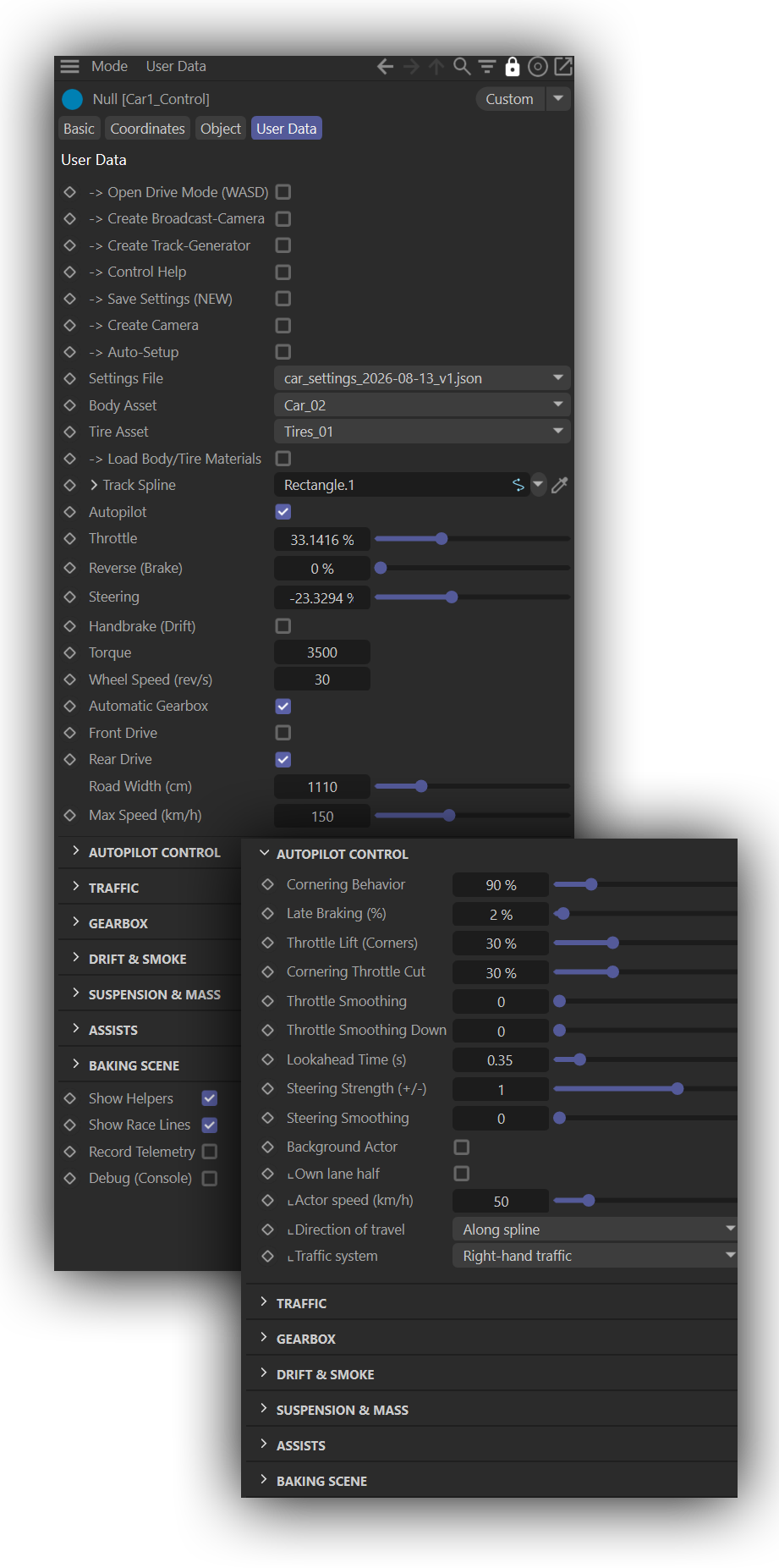
Track Spline
The path the vehicle follows. Connects to the Track Spline from the Track Generator for live updates.
Autopilot
Activates automated driving: lookahead, braking, cornering, and traffic awareness.
Throttle / Reverse / SteeringSliders
Overridable per channel via Drive Mode for hybrid manual/auto control.
Front / Rear Drive
Toggle between FWD, RWD, and AWD.
Torque
Wheel (SpeedEngine)
Configures engine output characteristics balancing torque and maximum wheel speed.
Settings File
Save and load complete vehicle configurations (dimensions, mass, controls) in a single file.
Autopilot Control
Max Speed (km/h)
The speed the autopilot aims for. With Automatic Gearbox on, the gearing scales with it — this is the master control for how fast the car is.
Cornering Behavior
How much of the available tyre grip the autopilot is willing to use in corners. 100 % is at the limit of what Grip Front/Rear gives, 50 % keeps half in reserve, above 100 % the car deliberately plans beyond its grip and slides on purpose. The rollover limit from track width and centre of gravity always applies as well — the lower of the two wins.
Late Braking (%)
Not brake force, but how much deceleration the autopilot believes it can achieve — and from that, where to brake. Low values mean early lift-off, high values mean it stays on the throttle and brakes late. It is also the master control over all corner limiters. Typical values are 15–35 %.
Lookahead Time (s)
How many seconds of road the steering aims ahead. The distance grows with speed, so the faster the car goes the further ahead it looks and the calmer it steers.
Throttle Lift (Corners)
Eases off the throttle ahead of a corner instead of holding it flat until the braking point. At 0 the whole block is off, including the throttle envelope and the traction limit on corner exit.
Traffic (race logic)
Road Width
Defines usable road width and the available racing lines for overtaking maneuvers.
Racing Line Swing (%)
Controls how aggressively the ideal line utilizes track width (outside-inside-outside).
Aggressiveness
Determines overtaking frequency and allowed speed surplus during maneuvers.
Defensive Yield
Forces slower cars to leave space, preventing unrealistic blockages.
Rubber Band
Keeps the vehicle pack tight by dynamically adjusting speeds of leaders and followers.
Brake Zone Length
Visualizes braking zones on the spline directly in the viewport.
Race Mode
Toggles between standard traffic logic and aggressive racing behavior.
Manual Racing Lane
Locks a vehicle to a specific lane for precise choreography.
Suspension & Mass
Spring Rate F/R
Adjusts suspension stiffness and damping. Influences pitch, roll, and overall stability.
Grip Front / Rear
Defines tyre grip per axle. Balance dictates oversteer or understeer tendencies.
Travel Usage
How much of the available suspension travel the car is allowed to use — the range between the workshop spheres.
Tire/Brake/ReverseLight Links
The rig links these meshes itself: it searches the loaded body asset for objects named Brake / Brake Light / Bremslicht and reversing lights, and searches again after every body swap. Tire Tolerance draws the visible tyres slightly larger than the physics cylinder so they sit on the road instead of hovering. Purely cosmetic — the physics are unchanged.
Car and Tire Mass
Mass of the car and of a single wheel. Left at 0 both are worked out from the size of the vehicle.
Sphere Positions
Internal storage for the workshop sphere positions, used when saving and loading settings. Not meant to be edited.
Drift & Bake
Drift Smoke+ Smoke Amount
Integrated sprite system triggering upon wheelspin or lock, with adjustable opacity.
Drift Grip Rearrear grip in a drift
Primary control for drift behavior, dictating breakaway ease and slide duration.
Pyro-Wheelspin Plateplaceholder
Generates placeholder planes under slipping tyres as emitters for custom pyro or particle setups.
Show Helpers
Global toggle for viewport helpers (lines, braking zones, lookahead points).
Start Baking
Converts simulations into fixed keyframes for renderer-agnostic playback and farm rendering.
Bake: only this carCheckbox
Isolates baking to the selected vehicle, maintaining live simulation for the rest of the scene.
Delete BakeButton
Reverts a baked vehicle back to live simulation mode instantly.
BROADCAST CAMERA
The Camera
An automated camera system linked to the track. Generate broadcast-style tower sequences, chase cams, and onboard angles without manual keyframing.
The camera follows the track spline, anticipating the vehicle's path to allow for natural tracking and leading shots. The Avoid Crossing the Line feature ensures consistent screen direction during cuts.
Utilize 15 integrated presets ranging from TV Broadcast and Helicopter to mounted Bumper Low angles. Presets configure all underlying parameters instantly and can be customized and saved.
The Shot Editor allows for precise, repeatable sequence building by defining frame ranges, camera modes, and target vehicles in a clear list format.
Shotlist Editor
TRACK GENERATOR
The Track
Generate road, kerbs, embankments, and surrounding terrain in one object either procedurally or mapped to a custom spline.
Create tracks procedurally using seed values, corner counts, and radius limits to generate closed, drivable circuits instantly.
Alternatively, map the generator to a custom spline. Use interactive layout spheres in the viewport to manipulate the track and terrain dynamically.
The system generates complex road profiles including width-dependent kerbs, shoulders, and embankments with noise parameters to avoid linear extrusion aesthetics. Banking is calculated automatically based on corner radius.
Procedural terrain generation blends seamlessly with the road geometry, integrating adjustable hills and falloffs so the track sits naturally in the landscape.
The output is a live Track Spline object ready to link directly to the vehicle's autopilot and camera systems.
Shotlist Editor
REQUIREMENTS
Cinema 4D 2023 or newer (tested with 2023, 2025 and 2026)
Windows or macOS
No plugins required — physics run on Cinema 4D's built-in Bullet dynamics
Internet connection for the first activation, offline afterwards
(re-check every seven days)
Features
Dynamic Car Rig
- Physics-driven vehicle, no keyframes
- Editable asset shelf from assets.c4d: bodies, tires and suspensions
- Autopilot with braking points and racing lines
- Drive Mode: WASD in the viewport, live
Racing-line steering with Q / E and SPACE for drifts - Multi-car traffic and racing logic
- Overtaking, defensive yield, rubber band
- Background actors for simple street traffic
- Body and tire assets from a shelf, swappable live
- Automatic brake and reverse light linking
- Drift and smoke
- Traction control, ESP, rollover reserve
- Viewport handles for every dimension
- Settings files, save and load per car
- Bake per car - baked cars stay collidable
Broadcast Camera
- Six camera modes, over 15 presets
- TV tower sequences with automatic cuts
- Chase, side, front, rail and onboard mounts
- Avoid Crossing the Line for consistent screen direction
- Shot Editor for frame-accurate sequences
Workflow - Runs entirely inside Cinema 4D, no external app
Renderer-independent - Non-destructive, everything stays adjustable
- Built-in control help for all 150+ settings
- One-time payment, all v1.x updates free
Track-Generator
- Procedural circuits from seed, corner count and radius
- Or mapped onto your own spline
- Road, kerbs, shoulders, embankment and terrain in one object with vertex maps for texture mapping
- Automatic banking from corner radius
- Live Track Spline for car and camera
$89 INDIVIDUAL LICENSE
Freelancer, single seat
$149 SMALL STUDIO LICENSE
Agency with 2–10 seats
$249 ENTERPRISE LICENSE
Agency with 11 or more seats
One-time payment
All future v1.x updates free
COPYRIGHT
All artwork on this site are Copyright © 2017 Florian Renner, or their respective copyright holders. Do not use without permission.
Impressum
CONTACT
Florian Renner, Munich, Germany
mobile: +49 (0)157.74 74 74 89
mail: hello (at)florenoir.de